
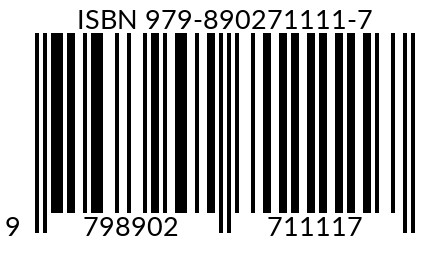
An ISBN and a barcode are connected, but they are not the same thing. The ISBN is the 13-digit identifier assigned to a specific book edition and format from a specific publisher. The barcode is the machine-readable graphic printed on a physical book so a scanner can capture that identifier quickly.
Think of the ISBN as the data and the barcode as one way to carry that data. A paperback can have ISBN 978-1-23456-789-0 printed on its copyright page and represented as black bars on the back cover. The number identifies the paperback product; the barcode lets retailers and warehouses scan it.
A print book intended for normal retail distribution generally needs both. An eBook may use an ISBN depending on the platform and distribution plan, but it does not need a printed barcode because there is no physical copy to scan.
The comparison below answers the most common production and distribution questions.
|
Comparison |
ISBN | Book barcode |
What the author decides |
| What it is | A 13-digit identifier | A machine-readable graphic | Obtain the identifier before making the symbol |
| Primary purpose | Distinguishes an edition and format | Speeds scanning at sale and in inventory | Use both for normal retail print distribution |
| Appearance | Digits, often shown with hyphens | Vertical bars plus readable digits | Verify that both show the same ISBN-13 |
| Typical users | Publishers, libraries, booksellers, distributors | Retailers, warehouses, printers | Match every channel’s requirements |
| Where it appears | Metadata and usually the copyright page | Usually the back cover of a print book | Follow the printer’s cover template |
| Paperback or hardcover | Normally required for trade distribution | Normally required for scanner-based retail | Use a unique pair for each format |
| eBook | Platform-dependent; may be optional | Not needed | Never reuse the print ISBN |
| Price information | Does not encode the retail price | Optional EAN-5 may show a suggested price | Regenerate the graphic if encoded price changes |
| Cost | Depends on agency or service terms | May be free, bundled, or paid | Compare ownership, quality, and compatibility |
| What changes it | New edition, format, or publisher product | New ISBN or an embedded-price change | Do not replace an ISBN for a simple price update |
| Level of identification | One product edition and format | The same product, not each individual copy | Do not confuse it with a SKU or serial number |
ISBN stands for International Standard Book Number. Modern ISBNs contain 13 digits. The identifier distinguishes one specific monographic publication or product form from another and connects that product to its publisher and descriptive metadata.
An ISBN record can include the title, subtitle, contributors, publisher or imprint, edition, language, publication date, and product form. Booksellers, libraries, distributors, wholesalers, and metadata systems use the identifier to order and describe the correct product.
An ISBN does not prove copyright ownership, register the text with the government, set the retail price, or track one individual copy. All copies of the same unchanged edition and format normally carry the same ISBN. Learn more in ISBN Numbers and Copyright and ISBN Ownership.
The paperback, hardcover, audiobook, and a separately available digital edition are different products. When an ISBN is used for those products, each receives a different number. A revised or second edition also receives a new ISBN. The earlier edition keeps its original identifier.
That product-level distinction prevents a bookstore from ordering a hardcover and receiving a paperback, or a reader from buying a revised edition and receiving the old text. Use the multiple-ISBN format guide to plan a full release.
Bowker is the official ISBN agency for publishers located in the United States and its territories. Publishers in other countries should use the agency appointed for their location, which can be found through the International ISBN Agency directory.
ISBN Services is not Bowker or the official U.S. agency. It supplies ISBN and barcode services under the publisher terms stated for its Basic and Custom products. Confirm which publisher name will appear and whether the product is compatible with every intended platform before ordering.
A book barcode is a graphical, machine-readable representation of the book’s ISBN and, when used, an optional price add-on. On most retail print books, the main symbol is a Bookland EAN-13 barcode built from the 13-digit ISBN.
When a scanner reads the symbol, the retailer’s system captures the ISBN. The retailer then looks up its own catalog record, price, and inventory information. The bars do not hold the full title, author biography, description, stock count, or copyright record.
Bowker describes the barcode as a graphical representation of a book’s ISBN and price and says barcodes facilitate automated sales and inventory tracking for physical books. That is why a barcode is normally placed on a paperback or hardcover sold through bookstores, wholesalers, or other scanner-based channels.
Many book barcodes include a smaller five-digit EAN-5 add-on to the right of the main ISBN symbol. It can represent a suggested retail price in a designated currency. For example, 51999 commonly represents US $19.99. The value 90000 is often used when no suggested price is encoded.
The price add-on is not the book’s live checkout price. Retailers can charge a different amount because their point-of-sale system controls the transaction. If the price changes, the ISBN stays the same. A barcode image that embeds the old price may need to be regenerated or replaced on the next cover file or print run.
Every copy of the same edition and format normally uses the same ISBN barcode. It identifies the product, not one individual copy. Retailer SKUs, fulfillment labels, lot codes, or serial numbers serve different operational purposes and should not be confused with the ISBN.
Plan on both an ISBN and a correctly produced barcode when the print book will be sold through bookstores, distributors, wholesalers, libraries, or online retailers that accept physical inventory. The ISBN identifies the product; the barcode supports scanning and stock handling.
The ISBN is still the product identifier when the platform requires or accepts one. Many print-on-demand services can place a barcode automatically if the cover leaves the required space. Check the current platform specification before uploading; do not assume every provider uses the same placement or file rules.
A private family book, classroom handout, promotional booklet, or print project sold only through a controlled direct channel may not need an ISBN or a retail barcode. The moment broader trade distribution is planned, revisit the requirements before assigning identifiers or finalizing the cover.
An eBook has no physical cover to scan, so it does not need a printed barcode. Whether it needs an ISBN depends on the retailer or distributor. Some platforms assign their own identifier or do not require an ISBN; broader distribution, library supply, or independent metadata management may justify one. Never reuse the print ISBN for the eBook.
A digital audiobook does not need a printed retail barcode. An ISBN may be used when the platform or distribution plan calls for one. A physical audiobook product, if independently sold in a scannable retail package, is a separate product and should follow the applicable identifier and barcode rules.
Assign one ISBN to the paperback and place a scannable Bookland EAN barcode on the back cover. Make sure the barcode digits match the ISBN entered in every distribution dashboard. If a hardcover launches later, assign it a different ISBN and barcode.
The paperback uses its own ISBN and physical barcode. The Kindle edition uses Amazon’s ASIN and does not need a printed barcode; an eBook ISBN may be used when required by another distribution channel. Do not put the paperback ISBN on the digital edition as though they were the same format.
Keep the same ISBN because the product has not changed. Update retailer and distributor price metadata. If the printed barcode contains a 51499 price add-on, create a corrected barcode or use the provider’s approved no-price code for future covers rather than leaving conflicting price data.
Send the exact assigned ISBN-13 and state whether a price add-on is required. Ask the designer to follow the printer’s current cover template and barcode specification. Before approving the proof, compare the human-readable digits, the copyright-page ISBN, and the title metadata.
If copies are produced and sold solely through the author’s own controlled channel, an ISBN or retail barcode may be optional. If the author later adds wholesale, library, or bookstore distribution, assign and register the appropriate product ISBN before creating the retail barcode.
A price change does not require a new ISBN. The product identifier stays the same. Update the price in each retailer or distributor system and allow time for the feeds to refresh.
If the price is encoded in the EAN-5 add-on, regenerate the barcode image or use the platform’s approved treatment when the cover is revised. An old printed price can confuse customers even though the checkout system may charge the correct amount.
Authors who expect frequent price changes often prefer a barcode without a specific printed retail price, when their distributor and target retailers accept it. Always confirm the current channel requirements rather than relying on a generic generator’s default.
The official U.S. ISBN agency is Bowker. ISBN Services is a separate service provider. State the relationship accurately so authors understand publisher registration and platform compatibility before purchasing.
Most trade-distributed print books need an ISBN and barcode, but a private or direct-only project may need neither. A digital edition has no physical barcode, and ISBN requirements vary by platform.
A paperback, hardcover, audiobook, and independently available digital edition are not one product. Assign distinct ISBNs when ISBNs are used for those formats.
The symbol carries the identifier and optional price data. Retailer systems use that identifier to retrieve their catalog and transaction data; the full metadata is not stored inside the black bars.
A picture that looks like a barcode is not automatically production-ready. Wrong digits, bad quiet zones, low resolution, distorted dimensions, or a mismatched price add-on can cause rejections or scanning failures.
A digital eBook is not scanned at a checkout counter. Include the correct ISBN in the eBook’s metadata or copyright information when appropriate, but do not add a retail barcode graphic simply because the print edition has one.
The identifier and the graphic can have separate costs. Bowker currently sells ISBNs and barcode files separately or in bundles; other providers and print-on-demand platforms have different pricing. A qualified designer may include barcode creation in a cover package.
There is no universal rule that a barcode must always be free or that authors should never pay for one. The real requirement is that the ISBN source, publisher designation, barcode specification, and target distribution channels fit the publishing plan.
ISBN Services’ Basic and Custom ISBN + Barcode products include a barcode, but they differ in publisher naming and platform compatibility. Review the current product pages before choosing; the cheapest option is not automatically the right option for every distribution strategy.
No. The ISBN is the 13-digit product identifier. The barcode is a machine-readable graphic that normally encodes that ISBN for scanning a physical book.
You generally need one for a paperback, hardcover, or other physical book sold through normal retail and distribution channels. A private or direct-only project may not. Check the requirements of every intended printer, retailer, and distributor.
You can create many kinds of barcodes, but a standard ISBN Bookland EAN barcode requires a valid ISBN-13 for that book product. A retailer SKU or fulfillment label is not a substitute for the book’s ISBN barcode.
No. There is no physical item to scan. The eBook may use an ISBN or a platform identifier depending on the channel, but it does not need a printed retail barcode.
Each physical format has its own ISBN and therefore its own barcode. Digital formats do not use a printed barcode. Never place the paperback’s barcode on the hardcover.
The ISBN stays the same. If the barcode includes a price add-on, update the graphic for future cover files or print runs and update the live price in distribution systems.
Usually on the lower area of the back cover, within the safe zone defined by the printer’s cover template. Exact size, placement, color, and quiet-zone rules vary, so use the current specification for the chosen printer.
Print-on-demand platforms often offer automatic barcode placement when the cover leaves an appropriate blank area, but workflows can change. Check the platform’s current cover instructions before submitting the final file.
Bowker. Publishers outside the United States should use the agency listed for their country or territory by the International ISBN Agency.
The reliable rule is simple: the ISBN identifies the book product; the barcode makes that identifier scannable. Decide the formats and distribution channels first, assign the correct ISBNs second, and generate the production-ready barcode only after the metadata is final.